Nishka Dhawan I’m a journalist. This means I’m constantly on calls or in meetings, and sometimes (read: always) it’s hard to keep track of them all.
I don’t want to drain the battery life of my iPhone by recording calls on Voice Notes, and then have to transfer them over to a transcription service just so I can keep track of summaries and notes.
There’s one product that truly made my life a little easier this week: the Plaud NotePin S.
Store all your notes and recordings in one place with this smart AI transcriber that supports 112 languages. Its quick and easy setup and minimalistic design made my day-to-day much easier as a journalist — now I can’t live without it.
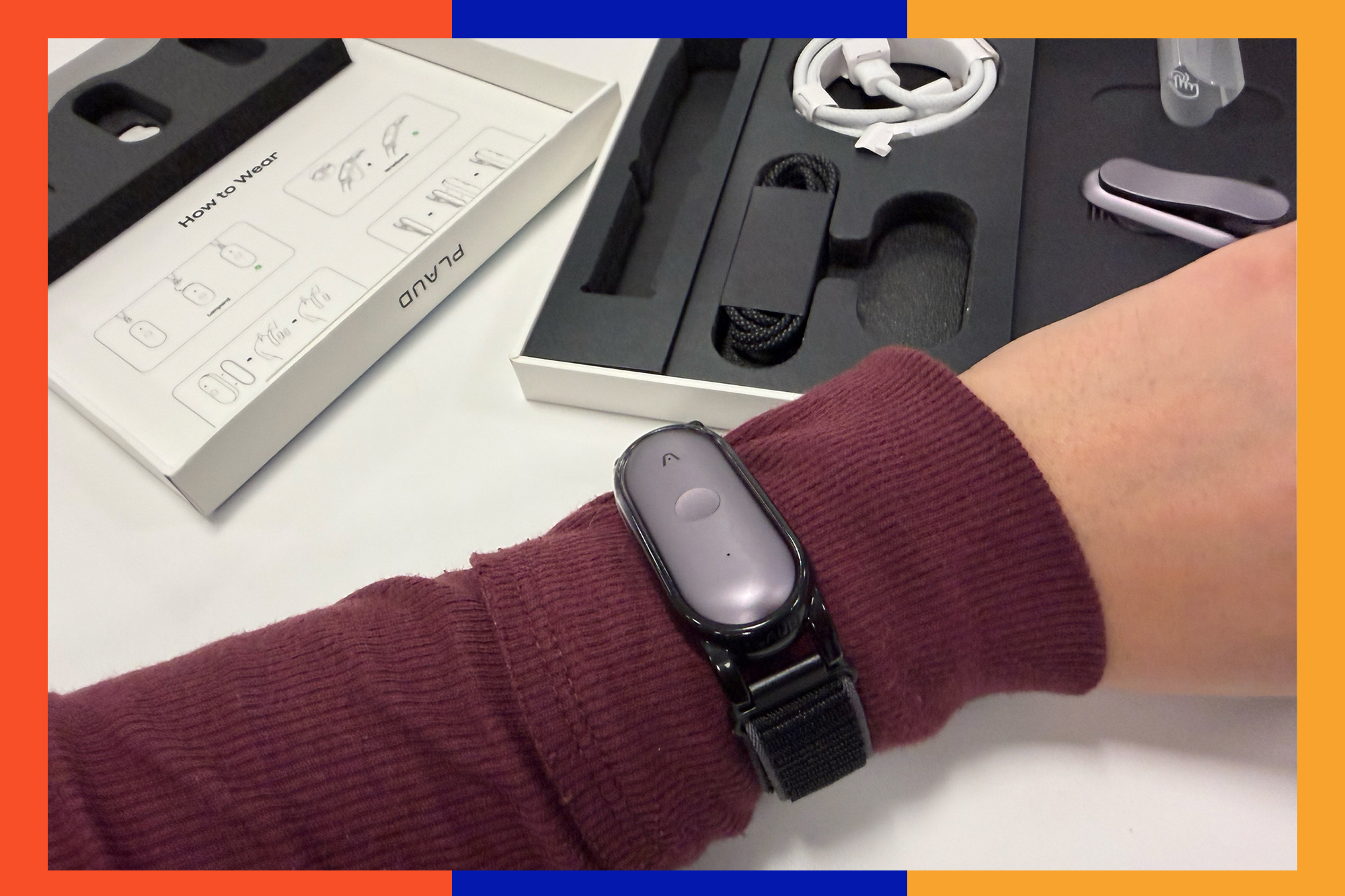
Plaud is a company that makes easy-to-use recording devices that automatically transcribe and summarize meetings for you. I had the chance to try the NotePin S and absolutely loved how small and sleek the device is. Out of the box, it comes with a wristband, a lanyard and a pin to attach this device to. This means you can take it with you everywhere you want to go, without worrying about leaving your new recorder behind.
Setup is easy, too — the whole thing took me about five minutes. I just downloaded the Plaud AI app, registered my device, and from there, all I had to do was learn that I had to long-press the center button to start recording.
I used the device in my meetings all week and found that it quickly and easily identified multiple speaker voices, even those that were at the other end of a conference room. The red light indicator lets me know the device is working, and a quick press on it again stops the recording, too.
Nishka Dhawan Transcription and summaries My biggest pain point with recording devices and apps is that they don’t really do any heavy lifting. I usually have to take the transcription and paste it into an AI app just to make sense of what was said. Plaud solves this issue by automatically providing me with quick meeting notes that are bulleted and easy to read, even highlighting meeting notes that I could refer to on a later date.
As I work on a revenue-based team, Plaud also provided me with a quantitative analysis of my meeting, carefully rounding up any stats that I might need to refer back to. I found the summary and meeting notes the most helpful, as Plaud also provided me with action items that I could take away from my meetings.
The one place it could still use work? Like every transcription service, the transcript Plaud generates is not the most accurate. While most of it was easy to read and understand, there were definitely some sentences that left me confused. I think that’s why the generated summaries are so important, as it makes the transcript much easier to read and understand — especially if you’re like me and have meetings that run longer than an hour daily.
The other thing that really stood out to me was the battery life. I had this nifty little device run multiple meetings for me and I still had enough juice to go the next day.
In fact, according to the brand, this device can continuously record for a full 20 hours without giving out — that’s big. My only annoyance: in the app, you can’t see the exact percentage of the battery life on this NotePin, just a status bar that shows you how much battery is left. So, it’s hard to quantitatively check just how much battery life this device uses per recording,
Since it comes with an included USB-C charger, too, it made it easy to add to my work setup without springing for an additional cable. The best part about the Plaud NotePin S is that you don’t actually need to buy a subscription to use it.
The portable recorder comes with 300 minutes of transcription included per month, and this includes access to 10,000 professional templates as well as custom templates. Remember when I said I was a little bothered by the actual transcription and wished there was a way to clean it up without exporting it? Well, some templates can help you do exactly that.
Nishka Dhawan Plans and features If you do take part in a lot of meetings, or just need a device that you can record your notes on — sometimes I use it to keep track of story ideas and thoughts — you can opt for the Pro and Unlimited plans. Pro gives you 1,200 minutes of transcription per month, and Unlimited means you can record as much as you want to review.
There are also other useful features, like a slider bar in preferences where you can adjust the sensitivity of the microphone depending on how loud the environment you’re in is. I adjusted the sensitivity when I was at a loud cafe, and the recorder picked up my and my colleagues’ voices just fine. Plus, you can register a voice match for your voice, so whenever you’re recording, it will automatically label your speech as you.
I also like that, apart from the Plaud smartphone app, there’s also a compatible Plaud desktop app to store your recordings on. Since everything is stored on the cloud, transcripts will sync as well. This is especially useful if I’m writing up an interview, since I can take quotes straight from the desktop app.
Finally, Plaud can transcribe 112 languages, according to the brand. I tried recording notes in Hindi to see if Plaud could accurately capture my mother tongue. I was actually shocked at how it was able to quickly transcribe Hindi to English and the fact that it was accurate. Although I was in a quiet setting during this recording, I would be curious to see if loud environments affected the efficacy of the recording in these cases.
All in all, if you’re looking for an easy-to-use recording device that quickly transcribes and provides accurate summary notes, the Plaud NotePin S is it. Its small form factor, extended battery life and free 300-minute transcription plan make this one of the best services on the market.
The big difference is that the Note Pin S comes with a tactile button that you can use to start a recording. It’s a small change, but a big one if you prefer to work straight from the device rather than head to the app.
Plaud says it keeps your data private and secure and is both HIPAA and ISO compliant, so your information is kept safe. This is big for me as I’d hate to have my private meetings leaked.
For over 200 years, the New York Post has been America’s go-to source for bold news, engaging stories, in-depth reporting, and now, insightful shopping guidance. We’re not just thorough reporters – we sift through mountains of information, test and compare products, and consult experts on any topics we aren’t already schooled specialists in to deliver useful, realistic product recommendations based on our extensive and hands-on analysis. Here at The Post, we’re known for being brutally honest – we clearly label partnership content, and whether we receive anything from affiliate links, so you always know where we stand. We routinely update content to reflect current research and expert advice, provide context (and wit) and ensure our links work. Please note that deals can expire, and all prices are subject to change.